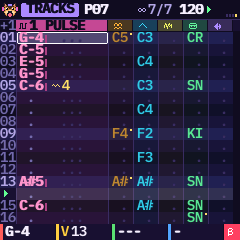
KAWA cheat sheetpocket tracker · M-VAVE FM-1 · firmware 0.10 beta
BUTTON pressBUTTONHOLD keep it pressedK1 a knob
The basics
SELECT
turns the pages of EDIT, LFO, ENV, FX, GLO · elsewhere: the row / step page / menu
ALGORITHM
the track · SONG: the entry · GROOVE: the step · OPTIONS: the metronome
PRESETS
SOUND 1: the factory sound · elsewhere: the page's cursor or the pattern
K1–K4
red, yellow, green, blue · the bottom line always says what they do
a button again
the next page of its group (EDIT, LFO, ENV, SCL, GLO, FX)
OCT− OCT+
the keys' octave · other pages: size, add/remove, OK/back
Holds a yellow bar fills first
HOMEHOLD
the help of the page you are on
HOMEHOLD+PLAY
PANIC: everything stops and cuts
FXHOLD
LIVE effects, for as long as you hold it
SAVEHOLD
the tools: OPTIONS, UNDO, REDO, CLEAR, COPY, PASTE, RANDOM
SAVEHOLD+OCT−/OCT+
UNDO / REDO, at once
RECHOLD+SELECT
rows the cursor jumps after a note (0–16)
Shortcuts
SAVE OCT+
save the song again, in its slot
OCT−/OCT+ (GRID)
the pattern's size: 16, 32, 64 steps
OCT+/OCT− (a sound in gold)
load the factory sound shown / keep yours
ARPHOLD+PRESETS
SOUND: next / previous engine
ARPHOLD+K3/K4
the cell's second effect
ARP tap
clear what is under the cursor
The ARP key clear / shift, not an arpeggiator
TRACKS
tap: clear cell · held+SELECT/ALGO: insert / remove a row
GRID
a step held + ARP: clears it
SOUND
held + PRESETS: next / previous engine
SONG
switches LOOP ⇄ SONG
LIVE
clears the LIVE lane
MIX
held + a black key: solo that track
Keys white / black, per page
GRID
16 steps on / off · black: the track
MAGIC
the 16 tools · black: the track
LIVE
the bank's effects · black: mute tracks
MIX
play the track · black: mute · ARP held: solo
SONG / GROOVE / PROJECTS
the entry's pattern (or “+”) / the step / the slot
KIT, sliced SAMPLE
black keys play too: the neighbour, an octave up
Sound engines
PULSE
12/25/50/75% or PWM, NES-style
WAVE
8 Game Boy-style 4-bit waves
NOISE
LONG or METAL, tuned by the note
FM
6 operators, 32 algorithms · one track at a time
KIT
16 drums, 8 kits
SAMPLE
a break in 16 slices, or your own sound
The pages of a sound
EDIT
SOUND · SOUND 2 · OPERATOR + OP ENV (FM) or SAMPLE EDIT · EFFECT · TABLE
LFO
LFO · MODULATION
ENV
ENVELOPE (ADSR) · MIX (levels, pan, sends, master)
a sound you edited
a star after its name · PRESETS shows the next in gold
one track, or all?
EFFECT = this track · MIX past track 6 (column M) = master
FX four pages
FX taps
SENDS · LIVE · FILTER · FX SEQ · back
LIVE OCT−/OCT+
4 banks: POCKET, WRECK, DESTROY, BEAT
K2 (DESTROY, BEAT)
the last pad's INTENSITY
K4 (LIVE)
the target: MASTER or a track
FILTER
K1 type · K2 freq · K3 reso · K4 move · keys tune it
FX SEQ
K1 an effect · a white key: on its step · ARP clears
Cell effects K3 picks it, K4 sets its value · ARP held: the cell's second effect
ARParpeggio of a chord, chiptune speed
GLIglides from the previous note
VIBvibrato
ROLthe note replayed 2–32 times in the row
BNDbends the pitch during the note
CHNchance: plays one time in N
DLYdelays the note in the row
CUTcuts the note in the row
REVa break's slice, backwards
PIT±12 semitones for this note
SHPchanges the waveform
CRUcrushes the bits of this note
VSLvolume slide over the row
PANpan for this note
OFSstarts further into the sample
HOPjumps to row N after this one
ENDthe pattern ends; the song moves on
DESTROY & BEAT LIVE, banks 3 and 4 · one at a time · from K-GLITCH
D1LOOP DESTROY
D2STUTTER X
D3GLITCH
D4SCRATCH (a hand)
D5REVERSE X
D6PITCH MAD
D7GATE X
D8FILTER CHAOS
D9BEAT REPEAT
D10BEAT SKIP
D11MICRO STUTTER
D12TIME STRETCH
D13RING MOD
D14FUZZ
D15RANDOMIZER
D16TOTAL CHAOS
B1RANDOM STUTTER
B2RANDOM BAR
B3RANDOM FILL
B4ROLL UP
B5SKIP 8TH
B6STAMMER 3-3-2
B7GATE 1/8
B8GATE 1/16
B9GATE 3-3-2
B10GATE RAMP
B11REVERSE BEAT
B12REVERSE OFFBEAT
B13SCRATCH BAR
B14SCRATCH CUT
B15TAPE STOP
B16HALF TIME
FILTER types: LP · HP · BP · NOTCH · DRIVE · COMB+ · COMB− · METAL · VOWEL · PHASER · RESON.
Magic SCL twice · K1 amount, K2 die, K3 track / pattern
1CHOPPER: cuts a break again
2BEAT: a rhythm
3MELODY in the scale
4BASS in the scale
5ARP: arpeggios on the notes
6EUCLID: N hits, spread evenly
7VARY: changes the pattern a little
8ROLLS: at the end of beats
9ACCENTS
10DOUBLE: doubles the length
11SHIFT: by one row
12CLONE: into a free pattern
13TRANSP: up one note
14COPY
15PASTE
16CLEAR